Most people encounter screen mirroring in a simple moment: finding a video on their phone that feels too good for a small screen. The instinct is immediate—send it to the TV. What follows, however, is a subtle decision that most users do not consciously think about: choosing between AirPlay and Chromecast.
The comparison of AirPlay vs Chromecast is often framed as a technical one, but in reality, it reflects deeper differences in ecosystem design, user control, and how digital experiences move across devices. Understanding that distinction is key to understanding why this debate continues to matter.
Why AirPlay vs Chromecast Matters in Modern Screen Mirroring
Over the past decade, the role of the television has fundamentally changed. Instead of being the primary device for discovering content, it has become the endpoint of a journey that begins on mobile. Users now browse, select, and control content on their phones, while the TV simply acts as a display layer.
This shift has made screen mirroring a core layer of modern digital infrastructure rather than a secondary feature. As a result, the discussion around Chromecast vs AirPlay is no longer about convenience alone. It is about who controls the bridge between devices, and ultimately, who controls the user experience.
AirPlay vs Chromecast: Core Differences in Technology and Design
At a surface level, both AirPlay and Chromecast allow users to move content from one device to another. However, their underlying philosophies are fundamentally different.
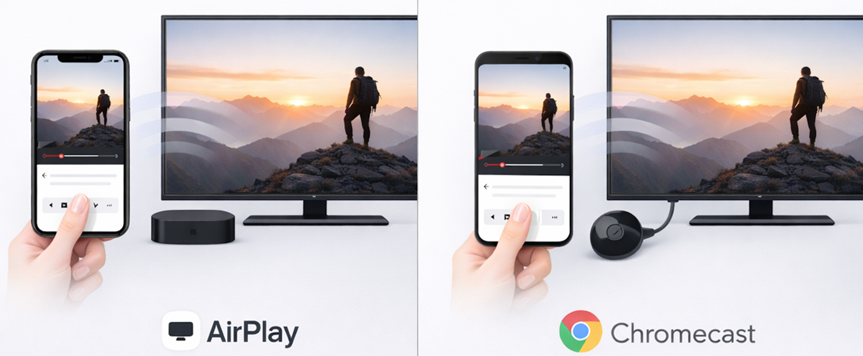
AirPlay is designed around deep integration within Apple's ecosystem. It prioritizes simplicity, predictability, and minimal user input. When used across iPhone, Mac, and Apple TV, the experience is tightly controlled and highly consistent, especially once you've set up iPhone screen mirroring properly. The system assumes that devices already "trust" each other.
Chromecast, by contrast, is built on openness and flexibility. It supports a wide range of devices, including Android, iOS, and web browsers. Instead of directly mirroring content in all cases, Chromecast often instructs the receiving device to fetch and play content independently. This design allows for broader compatibility, but introduces more variables into the experience.
AirPlay vs Chromecast: Control, Stability, and User Experience
When comparing Chromecast vs AirPlay, users are not just evaluating features. They are implicitly choosing between different trade-offs in control, stability, and usability.
In terms of control, AirPlay keeps the source device at the center of the experience. The phone or computer actively streams or mirrors content in real time. Chromecast, on the other hand, often shifts playback responsibility to the receiving device, turning the phone into a controller rather than a source.
From a stability perspective, AirPlay benefits from operating within a controlled environment, typically on a local network with optimized hardware integration. Chromecast's broader compatibility introduces more dependencies, including app behavior and network conditions, which can affect reliability.
User experience reflects these differences. AirPlay tends to feel more immediate and predictable, while Chromecast offers flexibility at the cost of occasional inconsistency. This is why the question of Chromecast vs Apple AirPlay often depends less on features and more on the user's device environment.
AirPlay vs Chromecast: Feature Parity vs Experience Consistency
With the introduction of AirPlay 2, Apple expanded its capabilities to include multi-room audio, improved synchronization, and lower latency. On paper, many of these features are comparable to what Chromecast already supports.
However, the AirPlay 2 vs Chromecast comparison reveals an important distinction. While both platforms offer similar capabilities, the consistency of execution differs significantly. AirPlay 2 delivers a uniform experience across Apple devices, while Chromecast's performance can vary depending on the specific device and application being used.
This difference is subtle but meaningful. Users may not articulate it directly, but they experience it as reliability versus variability.
AirPlay vs Chromecast Sound Quality: Real-World Performance Differences
In discussions about Chromecast vs AirPlay sound quality, specifications alone do not tell the full story. Both platforms are capable of delivering high-quality audio, including support for advanced codecs and high-resolution playback.
The perceived difference often comes down to consistency. AirPlay's tighter integration allows for more stable synchronization between audio and video, as well as fewer interruptions in controlled environments. Chromecast can achieve similar quality levels, but its performance is more sensitive to network conditions, device fragmentation, and application-level implementation.
As a result, the practical comparison is less about maximum audio fidelity and more about how reliably that fidelity is delivered during everyday use.
Chromecast vs AirPlay: Which Is Better for Different Users?
The answer to Chromecast vs AirPlay depends heavily on the user's ecosystem.
For users fully embedded in Apple's environment, AirPlay provides a seamless and intuitive experience that requires minimal configuration. The integration across devices eliminates many of the friction points that arise in cross-platform scenarios.
For users with mixed devices, such as Android phones, Windows laptops, and smart TVs, Chromecast offers greater flexibility. Its ability to function across different platforms makes it a more practical solution in environments where uniformity cannot be assumed.
This is why neither solution has fully displaced the other. Each is optimized for a different type of user context.
The Limitations of AirPlay vs Chromecast in Real Usage
Despite their strengths, both AirPlay and Chromecast share a common limitation: inconsistency in real-world scenarios. Users frequently encounter issues such as connection failures (like AirPlay not connecting to TV), latency, and device compatibility problems.
These issues are not always due to flaws in the technologies themselves, but rather the complexity of modern device ecosystems. Differences in hardware, software versions, and network environments introduce friction that neither solution fully eliminates.
As a result, the comparison of AirPlay vs Chromecast often overlooks a more important question: why does screen mirroring still feel unreliable in situations where it should be simple?
Beyond AirPlay vs Chromecast: A More Consistent Screen Mirroring Approach
The limitations of existing solutions have created space for alternative approaches that focus on consistency rather than protocol.
Tools like PigeonCast Screen Mirroring aim to simplify screen mirroring by abstracting away the differences between AirPlay and Chromecast. Instead of requiring users to choose between protocols, they provide a unified experience across multiple platforms, including iOS, Android, macOS, and Windows.
In practice, the process is straightforward: open the app, select your device, and start mirroring. The key difference is that it works consistently across environments, without requiring users to think about compatibility.
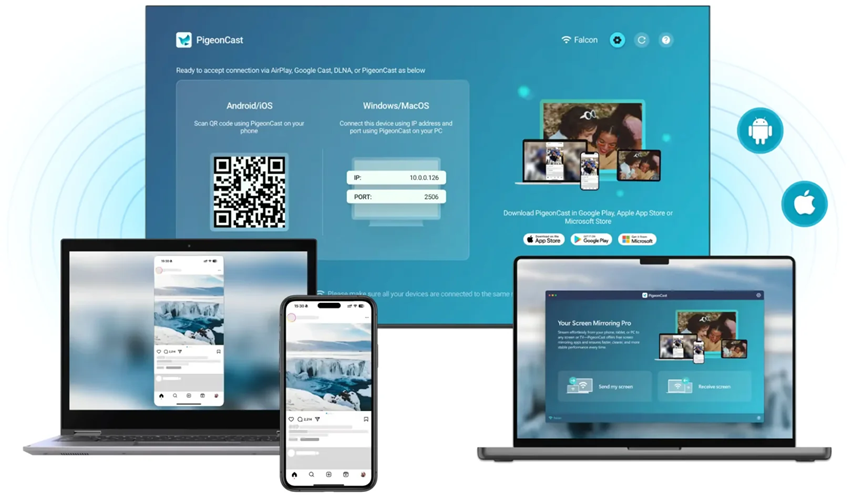
By reducing dependency on specific ecosystems and minimizing variability, this approach addresses the core issue users face: not a lack of features, but a lack of reliability.
Conclusion
AirPlay and Chromecast represent two enduring models in consumer technology. One prioritizes control and integration, while the other emphasizes flexibility and reach. Both approaches have proven viable, which is why they continue to coexist.
However, user expectations are evolving. As digital experiences become more seamless in other areas, tolerance for friction in screen mirroring continues to decline. The future of this space will likely be defined not by which protocol is superior, but by which solutions can deliver consistent, effortless connectivity across devices.
In that context, the discussion of AirPlay vs Chromecast becomes less about choosing a winner and more about understanding the limitations of both and what comes next.


 Entrepreneurship