There’s more to optimizing your brand’s online presence for conversions than crafting attractive marketing messages that resonate with your target audience.
Sure, compelling value propositions, calls to action, and visuals can guide leads into your sales funnel and engage their attention. In fact, any of these tactics can be exceptionally effective at elevating shoppers’ purchase intent.
However, they’re not necessarily sufficient to drive sales. And that’s not because they don’t matter, but because they can’t possibly work on their own. For next-level results, you also need to design an enjoyable user experience on your website.
The importance of UX design is relatively easy to understand. Consumers directly judge brands based on their ability to deliver enjoyable customer experiences. So, by optimizing for user experience, you won’t just leave a positive impression on first-time web visitors. You’ll also streamline your leads’ movement through the buyer’s journey.
In this guide, you’ll find several simple UX improvements that create better customer experiences in 2026, along with tips for how to incorporate them into your online presence.
Clearer Product Pages That Support Faster Buying Decisions
Clarity always wins when it comes to optimizing for user experience. After all, when consumers understand what you offer, how your solutions benefit them, and what they need to do to acquire your products or services, they’re far more likely to make a positive purchase decision than if they’re confused.
In fact, if you look into consumer behavior research, you’ll discover that uncertainty almost always leads to stalling in the sales funnel (or buyer abandonment). Reducing uncertainty, however, positively affects vendor lock-in and boosts customer acquisition/retention rates.
With this in mind, one of the easiest UX improvements you can implement to create better customer experiences is to design clearer product pages that support faster buying decisions.
Make it easy for buyers to understand your product catalog. Use visuals and copy to describe your product types and their use cases. And don’t shy away from using UX to help customers quickly identify the ideal product in your inventory to resolve their pain points.
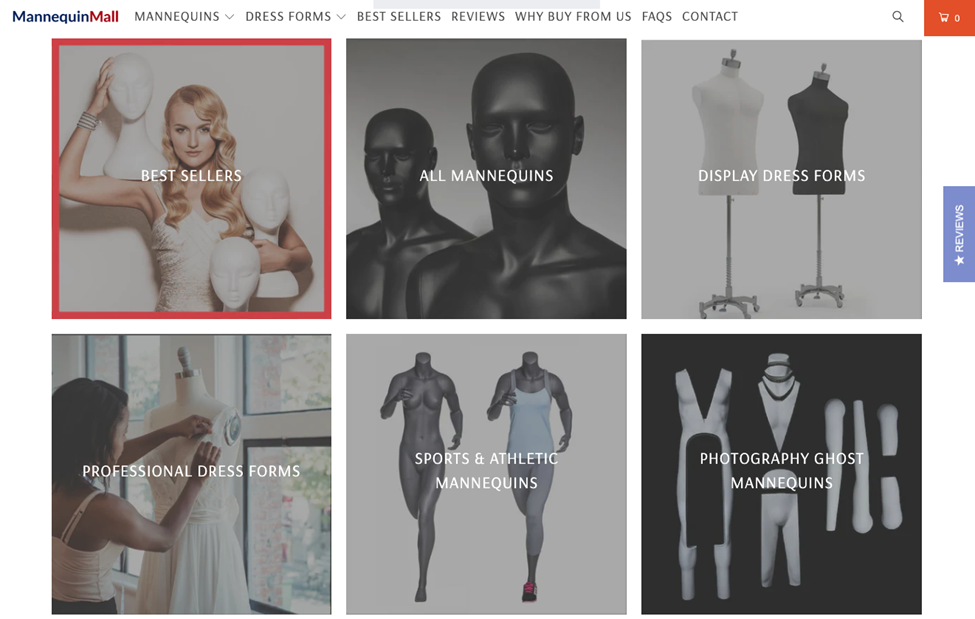
Mannequin Mall is a strong example of this UX design strategy. This brand holds a large inventory of versatile products, with each item serving a different purpose and meeting varying user needs. To avoid confusion and uncertainty, Mannequin Mall uses product categorization, visuals, and product details. Its goal is to help customers quickly identify the right mannequin, avoid confusion, and guide them through the sales funnel faster.
Source: mannequinmall.com
Easier Website Navigation for Faster Customer Journeys
Customer experience isn’t just about the quality of your products or the post-purchase support you provide. Instead, great CX is built across multiple brand touchpoints. It begins at the awareness stage and continues well into the loyalty stage of the sales cycle.
When designing your website — especially when aiming to create enjoyable brand interactions for your target audience — it’s essential to apply the same level of customer-centricity to the entire customer journey.
From a web design perspective, this means your online presence needs to help customers reach their goals, whether those involve discovering new products, completing a purchase, or finding post-purchase support resources.
One aspect of your brand’s website that can help you achieve this goal is your site’s navigation. Because it plays a key role in helping customers navigate the buyer’s journey, this UX element needs to be simple, efficient, and predictable. Yet, most businesses fail to make this happen.
According to research from the Baymard Institute, 58% of desktop and 67% of mobile sites have ‘mediocre’ or worse navigation performance.
So, how can you make your website navigation more user-friendly and effective at speeding up customer journeys? Well, a good rule of thumb would be to prioritize simplicity.
Keep the number of menu items in check. Use clear labels that align with the kind of language your ideal customers use. And ensure that the navigation menu is visible at the top of your screen, regardless of where your visitors are located on your site.
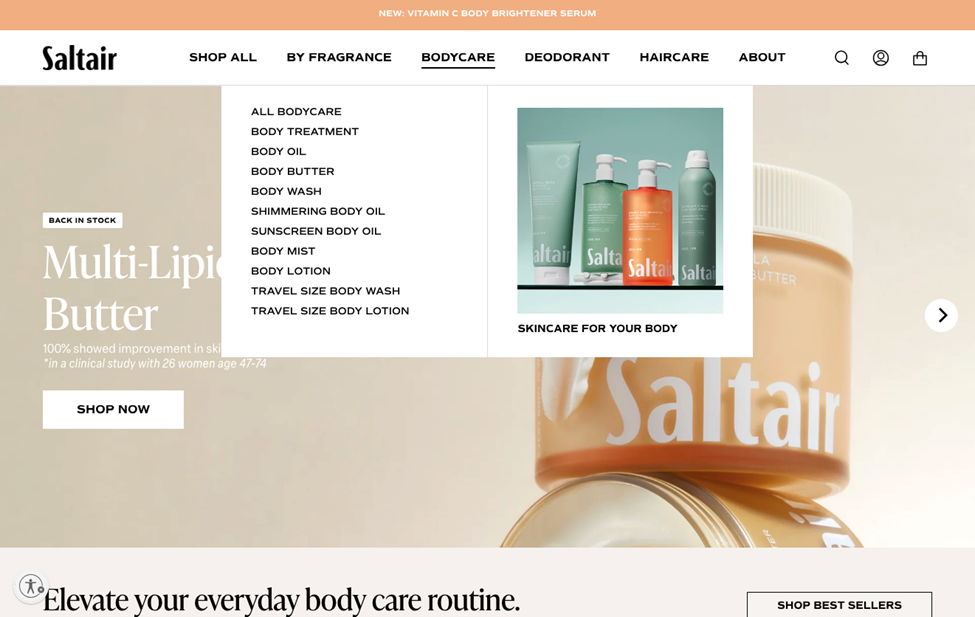
The Saltair website is an excellent example of a user-friendly, simple, and predictable navigation menu. On the surface, the UX element enables web visitors to easily find the product they need, using category labels, like ‘bodycare,’ ‘deodorant,’ and ‘haircare.’ However, it also enables shoppers to browse products based on fragrance — a somewhat unexpected, but greatly appreciated UX design choice that perfectly aligns with the brand’s target audience’s wants.
Source: saltair.com
Smarter Search and Filtering for Faster Product Discovery
Search is another commonly overlooked website element that impacts user and customer experience.
According to research on web user behavior, 69% of people head straight for the search bar when landing on a website. Yet, 80% leave because the on-site search experience didn’t meet their expectations. Even more, leading retailers in the US and UK say that 39% of website bounces happen due to inefficient search experiences, with shoppers being unable to find products relevant to their needs.
This data clearly indicates that investing in this aspect of UX goes beyond delivering immediate improvements in web performance. It could also create more streamlined shopping experiences, allowing buyers to discover relevant solutions faster (and speeding up their movement through the sales cycle).
One of the simplest methods to optimize site search for faster product discovery is to make this UX element highly visible on your landing pages. Moreover, incorporate search filters into the browsing experience to give shoppers maximum control over the items shown during their product discovery.
Golf Cart Tire Supply is an exceptional example of a business that understands the importance of easy product discovery. Because it offers a huge variety of (similar) products, it employs UX design to help users narrow down the highly specific solutions to their needs in record time. Ultimately, the brand comprehends that tire-related purchases depend on compatibility and specifications. So, by including advanced filters, intuitive categorization, and simple navigation elements in its website design, it effectively creates an enjoyable customer experience that’s fully optimized to drive conversions.
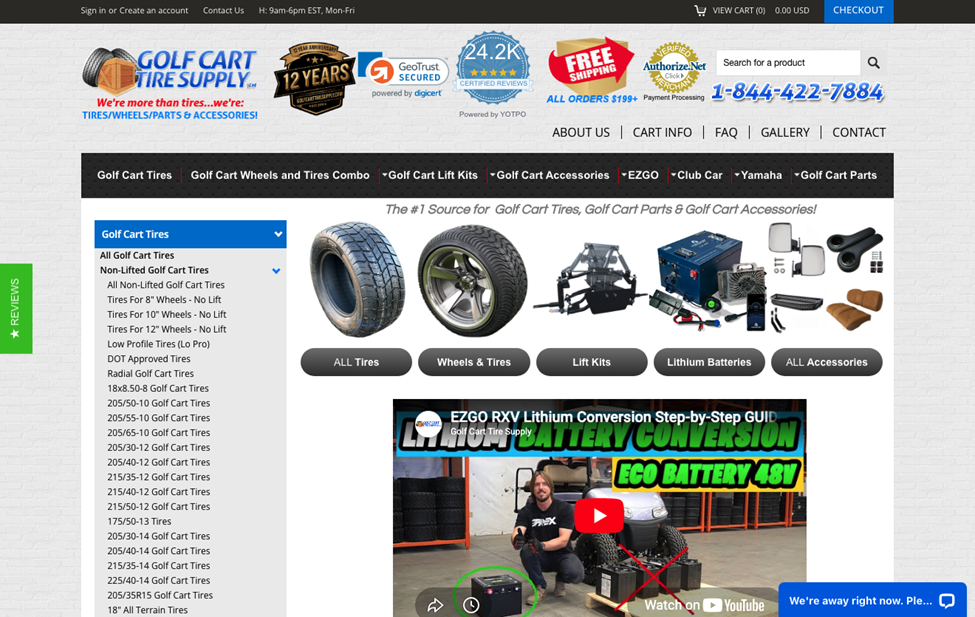
Source: golfcarttiresupply.com
Faster Mobile Experiences for On-the-Go Users
Creating enjoyable — and conversion-inspiring — website experiences requires you to adapt to how your target audience uses the internet. And, chances are, the majority of your web visitors will be browsing on their mobile devices.
In fact, if you look at the statistical data on how people use the internet, you’ll find that mobile web traffic accounts for about 52% of all website visits.
There are several mobile web design strategies you can implement to enhance customer experience and encourage movement through the buyer’s journey. However, if you’re looking for simple UX improvements, start with speed.
Research shows that load times directly impact web users’ willingness to stick around. So, if you can make your site faster on handheld devices, you may just as well keep visitors around for longer (maximizing their chances of becoming customers).
Key design tactics for doing so include compressing images, enabling lazy loading, and using a content delivery network.
If you prefer to focus on specific activities that will benefit your brand the most, the best thing you can do is use Google’s PageSpeed Insights tool to diagnose performance issues and get tips on how to fix them.
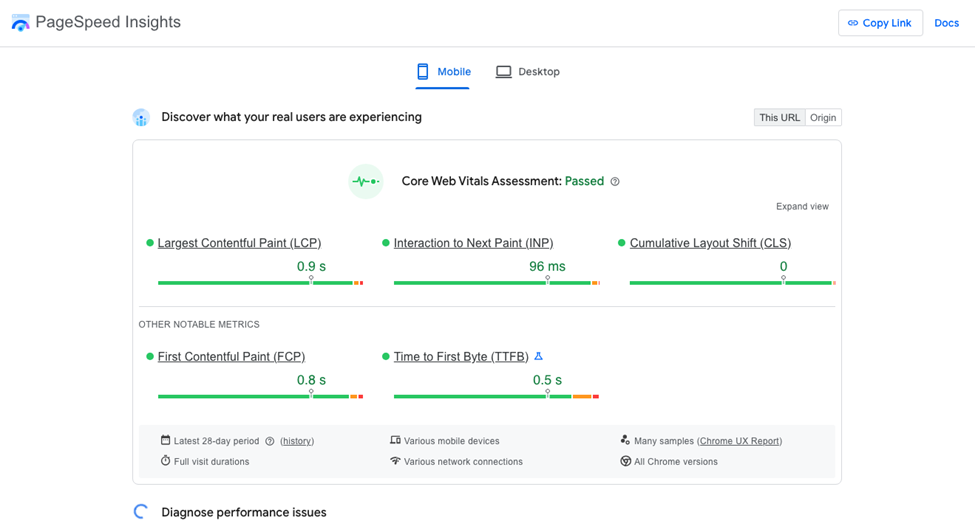
Source: pagespeed.web.dev
Stronger Trust Signals Throughout the Customer Journey
Brand trust directly influences consumers’ willingness to spend their hard-earned money. In fact, it’s equally important to product quality and price to 88% of shoppers.
But, while earning customer confidence largely depends on your branding and marketing strategies, it’s worth noting that web design — more specifically, user experience — also plays a role in establishing brand credibility.
Aesthetically attractive, highly functional, user-friendly sites naturally breed trust. Those that underperform, however, alienate potential customers, sending the message that your business isn’t a reliable entity capable of resolving their pain points.
The good news is that elevating web visitors’ confidence could be as simple as incorporating strong trust signals throughout the customer journey. When combined with a clean, user-friendly design, simple educational messages and credibility-boosting elements can go a long way in driving brand trust (and, consequently, conversions).
For instance, if you check out Performance Lab, you’ll notice that the business employs several UX design tactics to drive brand trust. These include the star ratings shown with every featured product, the ingredients tabs shown throughout the homepage, the science-backed positioning that highlights third-party certification, and the overall minimal look, which creates a trustworthy, premium-feeling browsing experience.
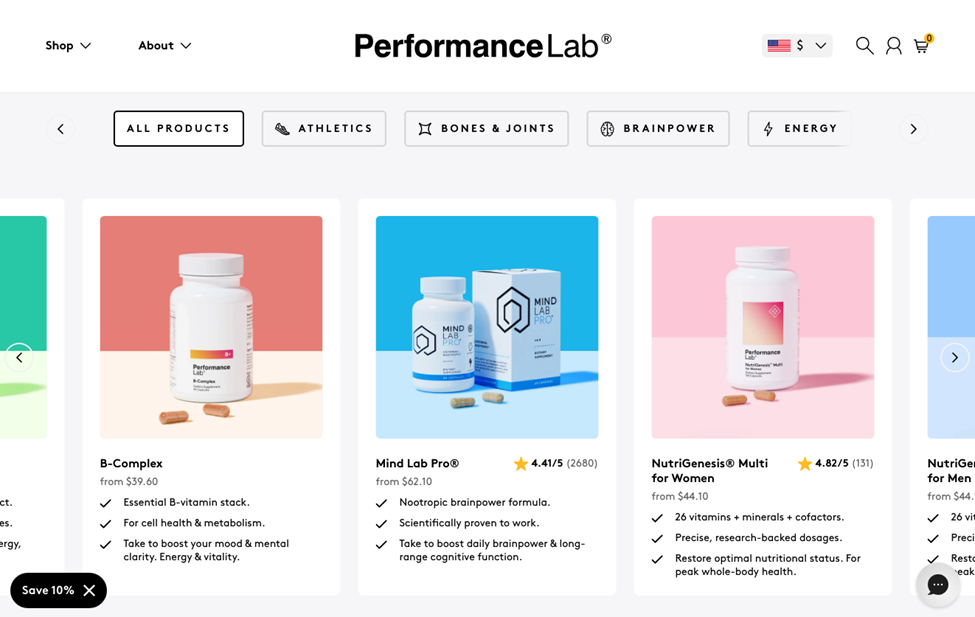
Source: performancelab.com
Personalized Experiences Without Unnecessary UX Complexity
Finally, when exploring opportunities to make simple UX improvements to create an enjoyable customer experience on your website, it’s crucial to remember that today’s consumers aren’t satisfied with being treated as just another face in the crowd. They want businesses to provide them with tailored interactions and shopping experiences.
In fact, if you look at some of the latest research on the question of CX personalization, you’ll find that 80% of consumers prefer brands that offer personalized experiences. And many will spend up to 50% more with such businesses.
So, the question isn’t whether personalization can help create a better customer experience (and drive conversions and loyalty as a result). The real issue is how to design personalized interactions without unnecessary UX complexity.
If the goal of UX design is to build streamlined paths for consumers to follow on their buyer’s journey, then the primary goal of implementing personalization is to make it feel approachable instead of overwhelming.
Good ways to do this include prioritizing context, giving web visitors customizable options without forcing them to use them, and limiting the number of choices visitors need to make, so as to prevent unnecessary distractions.
The Custom Sock Lab website, for instance, has a simple approach to CX personalization. Yes, it sells custom-made products that require a personalized product production process (which also involves a design phase). However, the business doesn’t position the ordering action as complex. Instead, it makes it super approachable with a structured, easy-to-follow UX that keeps the experience intuitive while allowing buyers to tailor their orders to their exact required specifications.

Source: customsocklab.com
Final Thoughts
Great user experience design doesn’t have to be complicated. Nor do you have to overhaul your entire online presence to make meaningful improvements to your web visitors’ experience while interacting with your site.
Yet, the value of investing in UX is tremendous. And the ROI won’t just be evident in your site’s ability to engage and convert new customers. An intuitive, user-friendly site will also contribute to your business’s online reputation, positioning your organization as a trustworthy, dependable entity in your niche that customers will want to buy from (and maybe even pay a premium for).

 Entrepreneurship